You might not realize that simply turning the ignition on with the engine off is the crucial first step to resetting the oil life on your Honda CR-V. Resetting the oil life indicator properly is essential for accurate maintenance tracking.
This procedure requires navigating specific menus on your vehicle’s multi-information display using the steering wheel controls, which many owners overlook. If you skip any step or reset incorrectly, the oil life indicator won’t update properly, potentially causing maintenance confusion.
Understanding the exact process ensures your vehicle’s system resets accurately every time. Taking the time to follow the correct steps helps maintain your Honda CR-V’s performance and longevity.
Key Takeaways
- Turn the ignition to ON without starting the engine to access the oil life indicator on the dashboard.
- Use the steering wheel controls or select/reset button to navigate to the oil life or maintenance menu.
- Press and hold the select/reset button for about 10 seconds until the oil life percentage blinks.
- Release the button, then press it briefly again to reset the oil life to 100%.
- Always reset the oil life indicator immediately after an oil change following the exact procedure for your CR-V model year.
How To Check The Current Oil Life On Your Honda CR-V

How can you quickly determine the current oil life on your Honda CR-V? Start by turning the ignition to the “ON” position without starting the engine. Use the steering wheel controls to navigate the multi-information display on the dashboard.
Turn the ignition to ON and use steering wheel controls to check oil life on the dashboard display.
Locate the “Oil Life” or “Maintenance” menu, which shows the oil change percentage remaining. This display updates in real time based on engine operating conditions and mileage since the last oil change.
If you recently had a dealership visit, the technician should have reset the oil life indicator, but it’s wise to verify it yourself. Monitoring this percentage helps you plan timely oil changes and avoid engine wear.
Regularly checking the oil life ensures your Honda CR-V runs efficiently and prolongs engine longevity.
Why Resetting The Oil Life Indicator Matters For Your Honda CR-V
Keeping track of your Honda CR-V’s oil life percentage is only part of maintaining optimal engine performance. Resetting the oil life indicator after an oil change ensures the system accurately monitors oil degradation based on driving conditions and time.
Neglecting this reset leads to misleading readings, causing you to either prematurely change oil or, worse, overlook necessary maintenance. This isn’t an irrelevant topic or a stray concept; it’s a critical step in your vehicle’s maintenance protocol.
The onboard system uses algorithms tied to mileage and engine operation, and failing to reset disrupts this calibration. By resetting the indicator, you maintain precise oil life tracking, safeguard engine components, and optimize fuel efficiency, essential factors for prolonging your Honda CR-V’s lifespan.
Step-By-Step Guide To Resetting Oil Life On Honda CR-V

To reset the oil life on your Honda CR-V, you’ll need to follow a specific sequence of steps using the vehicle’s dashboard controls. Avoid getting distracted by any irrelevant topic or random discussion during the process to ensure accuracy.
- Turn the ignition to the ON position without starting the engine.
- Use the “Select/Reset” button on the steering wheel or dashboard to navigate to the oil life indicator.
- Press and hold the “Select/Reset” button for about 10 seconds until the oil life percentage starts blinking.
- Release the button, then press it again briefly to reset the oil life to 100%.
This precise sequence ensures the system correctly records the reset and prevents errors tied to irrelevant topic diversions.
How Often To Reset The Oil Life Indicator On Honda CR-V
You should reset the oil life indicator on your Honda CR-V every 7,500 miles or as specified in your owner’s manual. Factors like driving conditions, engine load, and oil quality can affect when the reset is necessary.
Performing timely resets ensures accurate monitoring of oil degradation and optimal engine performance.
Recommended Reset Intervals
How frequently should you reset the oil life indicator on your Honda CR-V? Resetting at the correct intervals ensures accurate monitoring and avoids irrelevant topic distractions or unrelated concept errors in the system. Here’s the recommended schedule:
- After every oil change, regardless of mileage, to recalibrate the system accurately.
- Typically, every 7,500 to 10,000 miles, based on Honda’s guidelines for normal driving conditions.
- Immediately after any service that involves oil top-up or replacement.
- If you manually reset without changing oil, expect inaccurate oil life readings, so avoid resetting on an unrelated concept basis.
Sticking to these intervals maintains system precision and helps you track oil degradation effectively without causing sensor confusion or reset failures.
Factors Affecting Reset Timing
Following the recommended reset intervals guarantees your Honda CR-V’s oil life indicator functions accurately, but several variables influence when you should actually perform the reset. Factors like driving conditions, engine load, temperature extremes, and oil quality affect oil degradation speed, thereby impacting reset timing.
For example, frequent short trips or stop-and-go traffic accelerate oil wear, requiring earlier resets than highway driving. You shouldn’t treat oil life reset timing as an irrelevant topic or random concept. Precision matters.
Additionally, modifications to the vehicle or using non-recommended oil types can alter sensor readings or oil performance, affecting reset schedules. To ensure the indicator reflects true oil condition, monitor these factors carefully and reset the oil life indicator only after changing the oil or when the system prompts you, avoiding arbitrary resets.
Importance of Timely Resets
Why does resetting the oil life indicator promptly matter? It ensures your Honda CR-V’s maintenance system accurately tracks engine oil condition, preventing engine wear. Ignoring this can lead to misunderstandings fueled by irrelevant chatter and unrelated myths about oil changes.
You should reset the indicator every time you replace the oil, typically between 5,000 and 7,500 miles depending on your driving conditions.
Follow these steps for timely resets:
- Reset immediately after each oil change to maintain accurate monitoring.
- Avoid delaying resets; it can cause false alerts or missed warnings.
- Use the owner’s manual or onboard system prompts as your guide.
- Disregard unrelated myths suggesting resets can wait indefinitely.
Timely resets keep your engine protected and maintenance on track.
Troubleshooting Oil Life Reset Problems
Although resetting the oil life indicator on a Honda CR-V is generally straightforward, you may encounter issues such as the reset not initiating, the indicator failing to update, or error messages persisting.
First, ensure you’ve completed the oil change and tire rotation properly, as incomplete service can prevent the system from recognizing the reset command. Check that you’re following the correct button sequence on the dashboard or steering wheel controls, as any deviation can halt the reset process.
If the indicator remains unchanged, inspect the vehicle’s battery voltage; low voltage may disrupt the system’s memory. Finally, consult the onboard diagnostic system for error codes that could identify sensor or module faults interfering with the oil life reset.
Addressing these factors will help resolve most reset problems efficiently.
How Resetting Oil Life Varies By Honda CR-V Model
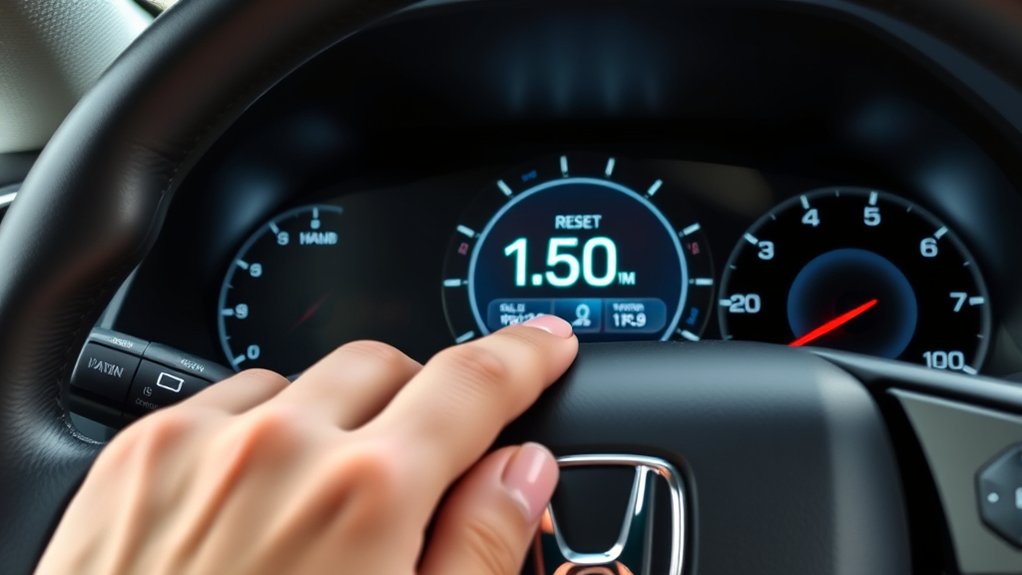
You’ll notice that the oil life reset process differs depending on your Honda CR-V’s model year, with some requiring button sequences and others using touchscreen menus. The specific steps vary, so it’s important to follow the procedure tailored to your model to avoid incomplete resets.
Additionally, dashboard indicators may display oil life information differently, affecting how you interact with the system.
Differences Across Model Years
Because Honda has updated the oil life monitoring system over the years, the process to reset the oil life indicator varies depending on your CR-V’s model year. You’ll notice these key differences:
- Older CR-Vs (pre-2012) may require manual resets via the trip meter button, emphasizing oil viscosity checks to prevent engine noise.
- Models from 2012-2016 introduced digital displays with menu navigation for resets.
- 2017-2020 CR-Vs integrate touchscreen interfaces, streamlining oil life resets alongside maintenance reminders.
- Latest models (2021+) feature adaptive systems that adjust oil life based on driving conditions and sensor data, requiring specific reset sequences.
Understanding these distinctions helps you maintain optimal engine performance and avoid increased engine noise due to improper oil viscosity or neglecting resets.
Varying Reset Procedures
Different Honda CR-V models require specific steps to reset the oil life indicator, reflecting changes in technology and dashboard interfaces over the years. For example, earlier models often use a combination of holding the select/reset button on the instrument cluster while turning the ignition on, whereas newer models may require navigating through the infotainment menu or using steering wheel controls.
It’s important not to confuse the reset procedure with irrelevant topics like general maintenance reminders or unrelated concepts such as trip meter resets. Each model’s owner manual details the exact method, so referencing it ensures accuracy. Being aware of these procedural differences prevents errors and guarantees the oil life indicator resets properly, maintaining your vehicle’s optimal performance and avoiding misinterpretation of dashboard signals.
Dashboard Indicator Variations
How does the oil life reset process differ across various Honda CR-V models? The dashboard indicators vary significantly, affecting how you approach the reset. Unlike an unrelated topic, this requires model-specific steps. Here’s a concise novice guide:
- 2007-2011 Models: Use the trip meter reset button; hold it while turning the ignition on until the oil life resets.
- 2012-2016 Models: Access the maintenance menu via steering wheel controls; select “Oil Life” and reset.
- 2017-2019 Models: Navigate through the multi-information display using the dashboard buttons; confirm reset.
- 2020 and newer: Utilize the touchscreen interface to reset oil life via settings under vehicle maintenance.
Understanding these variations ensures precise oil life resets tailored to your CR-V’s dashboard system.
Tips For Maintaining Your Honda CR-V’s Oil Life System
Why should you regularly monitor the oil life system in your Honda CR-V? Because it provides essential, real-time data on engine oil degradation, helping you optimize maintenance intervals and prevent engine damage.
To maintain accuracy, reset the system only after an oil change using the correct procedure, avoiding assumptions based on irrelevant topics like unrelated dashboard alerts. Keep the engine running temperature within manufacturer specifications to ensure sensor reliability.
Avoid using aftermarket oils that might interfere with sensor readings. Regularly inspect the oil level and quality manually to cross-verify system data.
Also, keep the vehicle’s software updated, as outdated firmware can cause inaccurate oil life calculations. By adhering to these tips, you ensure the oil life system functions precisely, safeguarding your engine’s performance and longevity.
When To Visit A Mechanic Instead Of Resetting Oil Life Yourself
When should you leave the oil life reset to a professional? If you encounter complex issues beyond a simple reset, it’s best to visit a mechanic. Avoid diving into irrelevant topic distractions or random tangents that don’t address the core problem.
Consider consulting a mechanic if:
- Your oil life indicator malfunctions or doesn’t reset after following the manual.
- You notice warning lights related to engine oil pressure or quality.
- There’s evidence of oil leaks or unusual engine noises.
- You’re unsure whether the oil change was performed correctly or if OEM-specific procedures are required.
These situations demand precise diagnostics and professional tools. Attempting a reset alone might mask underlying mechanical failures, leading to costly repairs. Leave it to experts for accurate assessment and maintenance.
Frequently Asked Questions
What Type of Oil Is Best for a Honda CR-V?
You should use synthetic 0W-20 oil for optimal engine performance and longevity in your Honda CR-V. This choice supports accurate oil life monitoring and ensures the reset procedure works correctly after oil changes.
Can I Reset the Oil Life Indicator Without Turning on the Engine?
Yes, you can reset the oil life indicator with the engine off by turning the ignition to the “On” position without starting the engine. Then, follow the reset procedure on the dashboard display to clear the oil life reminder.
Does Resetting Oil Life Affect My Vehicle’s Warranty?
Imagine flipping a switch to refresh your dashboard; performing correct reset procedures won’t void your warranty.
Honda’s system expects this maintenance, so as long as you follow guidelines, resetting oil life has no warranty impact.
How Does Driving Style Impact Oil Life on a Honda CR-V?
Your driving habits directly affect oil life by influencing engine stress and contamination rates. Aggressive acceleration or frequent short trips accelerate oil degradation, so you’ll rely more on maintenance reminders to ensure timely oil changes and optimal engine performance.
Are There Any Apps to Monitor My Honda Cr-V’s Oil Life?
Yes, you can use apps like HondaLink for oil life monitoring with app integration. These apps provide real-time data, maintenance alerts, and detailed diagnostics, helping you track your Honda CR-V’s oil condition precisely and conveniently.
Conclusion
Resetting the oil life on your Honda CR-V isn’t just a routine task—it’s the heartbeat of your engine’s maintenance. By following the precise steps, you guarantee accurate monitoring and peak performance.
Skipping this reset is like flying blind, risking premature wear. Remember to reset after every oil change and address any persistent issues promptly.
Stay vigilant, keep your system calibrated, and your CR-V will run smoothly, mile after mile. Properly resetting the oil life on your Honda CR-V ensures your engine stays in top condition for years to come.